



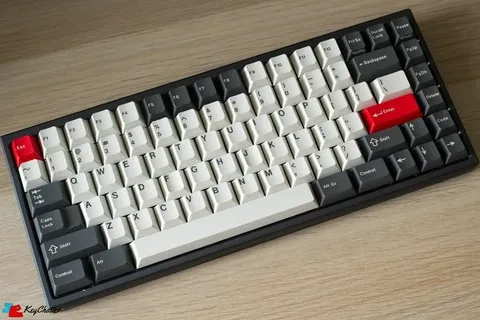
If you’re in the market for a compact and efficient mechanical keyboard, a 75% keyboard might be the perfect choice. With its space-saving layout and full functionality, it’s becoming a favorite among gamers, coders, and productivity enthusiasts alike. But before making your purchase, there are several key factors you should consider. This 75 keyboard buying guide: what to look for before you buy will help you make an informed decision.
What Is a 75% Keyboard?
A 75% keyboard is a compact keyboard layout that typically includes around 84 keys. It retains the function row, arrow keys, and a few navigation buttons (like Home and Delete) while removing the number pad and some spacing between key clusters.
Key Advantages:
- Compact Size: Saves desk space while retaining essential keys.
- Portability: Easier to carry for on-the-go users.
- Efficient Layout: Keeps commonly used keys within reach.
Key Features to Consider
1. Switch Type
One of the most important aspects of any mechanical keyboard is the type of switches used. Common switch types include:
- Linear (e.g., Cherry MX Red) – Smooth keystrokes, ideal for gaming.
- Tactile (e.g., Cherry MX Brown) – Bump feedback, great for typing.
- Clicky (e.g., Cherry MX Blue) – Audible click and bump, preferred by typists.
Your typing preference and use case should guide your switch selection.
2. Build Quality
A sturdy keyboard can last for years. Look for:
- Aluminum or high-quality plastic cases
- PBT keycaps for durability and texture
- Hot-swappable PCBs (if you plan to change switches)
3. Connectivity Options
Many 75% keyboards come with multiple connectivity options:
- Wired (USB-C)
- Wireless (Bluetooth or 2.4GHz)
Choose based on your setup and whether you need portability or minimal cable clutter.
Layout and Key Placement
Although all 75% keyboards have a similar compact layout, the exact placement of keys can vary by brand. Make sure to check for:
- Function row access (via FN key or dedicated)
- Arrow key spacing
- Position of Home/End/Page Up/Down keys
A good 75 keyboard buying guide: what to look for before you buy should always highlight key layout differences, especially for productivity users.
Additional Features
Here are a few extras that can enhance your keyboard experience:
- RGB lighting for aesthetic and visibility
- Programmable keys for macros and shortcuts
- Software support for customizing layout and functions
Budget Considerations
Prices for 75% keyboards can vary widely—from budget-friendly models under $50 to premium builds over $200. Determine your must-have features and set a realistic budget accordingly.
Recommended Use Cases
- Gamers: Benefit from the compact size without sacrificing performance keys.
- Writers & Coders: Appreciate the tactile feedback and efficient layout.
- Remote Workers: Enjoy portability and workspace organization.
Final Thoughts
When choosing your ideal keyboard, this 75 keyboard buying guide: what to look for before you buy is your go-to resource for narrowing down your options. Whether you’re seeking a sleek minimalist keyboard for your office or a colorful RGB deck for gaming, the 75% layout offers a versatile solution. Always evaluate switch type, build quality, layout, and connectivity to find the perfect match for your needs.
Remember, the right keyboard can transform your entire computing experience—so choose wisely.